
How to Virtually Try On Clothes Online
Upload a person photo and a garment reference to see the outfit on that person before you buy or publish. A step-by-step guide to photo-based virtual try-on, what it preserves, and what it cannot tell you.
AI Clothes Changer Editorial Team · Updated October 20, 2026
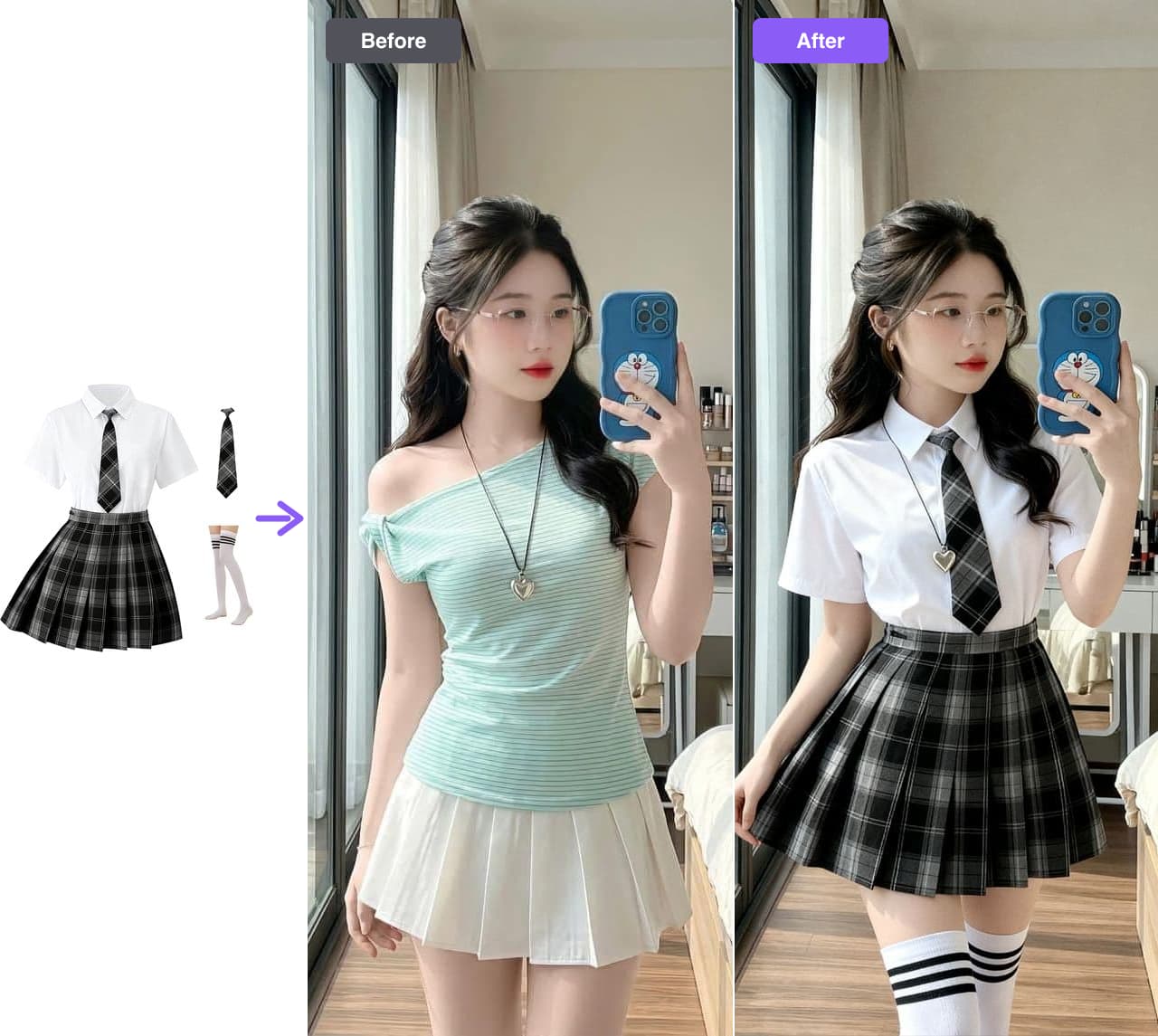
Trying clothes on online usually means one of two things: guessing from a size chart, or holding a phone up while an AR filter pastes a shirt onto you. Neither answers the question most shoppers actually have — how would this garment look on this person, in this photo, in this light?
Photo-based virtual try-on answers that one. You bring a photo you already have and a reference for the garment, and the tool renders the outfit onto the person. No fitting room, no live camera, no Photoshop session.
This guide walks through the workflow, what the result can and cannot tell you, and the mistakes that make a try-on look fake. If you just want the tool, open the virtual try-on clothes editor.
Two different things called "virtual try-on"
The phrase covers two products that solve different problems:
- Live AR try-on — a camera feed with a garment overlaid in real time. Good for accessories and quick novelty, limited by tracking accuracy and lighting.
- Photo-based try-on — an image edit. You upload a person photo and a garment, and the tool rebuilds the clothing in that scene. Good for planning an outfit, building a lookbook, or previewing a product on a real model.
AI Clothes Changer is the second kind. Everything below assumes you are working from a still photo, not a camera feed.
What you need before you start
Three things, and the first one matters most:
- A person photo. Sharp, evenly lit, with the current outfit visible from shoulders to hips. A front-facing shot or a slight turn works better than a dramatic pose.
- A garment reference. A flat lay, a product shot, or an on-model photo. In Pro mode you also describe the styling in words.
- A free account. Google sign-up includes 20 free credits, enough for two Preview generations, with no card required.
If you only have a low-resolution screenshot of the outfit you want, find the product page and use the original image instead. Blur and compression leave the model guessing, and guessing is what produces the uncanny results people complain about.
How to try on clothes online, step by step
1. Start from a sharp, front-facing person photo
Open the AI Clothes Changer editor and add your person photo. Keep the pose uncomplicated: crossed arms, a heavy crop, or a subject half-hidden behind an object all make the edit harder. The clothing you want to replace should be fully visible.
2. Add a garment reference
Upload a flat lay or on-model photo of the piece; if you are using Pro, also type the styling in plain words. A clean background helps the tool read the garment's shape, color, and texture. When the reference is cropped mid-garment, the result usually invents the missing part — and it shows.
3. Choose Preview, Studio, or Pro
| Mode | Credits | Output | Best for |
|---|---|---|---|
| Preview | 10 | 1 image | A quick check before committing |
| Studio | 20 | Up to 4 variations | Comparing similar pieces or colorways |
| Pro | 20 | 1 image, prompt required | Directing the styling in words |
Every mode draws from the same credit balance. See plans and credits for the full breakdown.
4. Generate and review at full size
Processing time depends on the mode, the number of variations, and demand. When the image is ready, compare it against your source photo and check four things: the face, the pose, the background, and the garment details. A result that reads well as a thumbnail can still show a warped collar or a changed hand at full size.
5. Download the result
Save the image you want. Your source photos are never modified, so the same person can be reused for as many garments as you need — which is the whole point when you are building a set rather than checking one outfit.
Where this fits: checking an outfit before a purchase, planning a shoot, restyling a headshot, or producing consistent product images for a small shop.
Same person, same pose, same room — only the outfit moves.
What the result keeps, and what it does not
A good try-on holds the person and the scene steady and moves only the clothing. That means you can trust it for:
- Silhouette and drape — how the garment sits on that body shape.
- Color and pattern against skin tone — the question a product grid cannot answer.
- Styling — whether the piece works with the rest of the outfit and the setting.
It does not tell you:
- Whether it will fit. No image model knows your measurements.
- Exact color under every light. Screens, photos, and fabric all shift color.
- How the garment moves. Fabric behavior in motion is not in a still image.
Treat the output as a better-informed preview, not a guarantee. That framing is also the honest one to use if you publish the images.
Common problems and fixes
| Symptom | Likely cause | Fix |
|---|---|---|
| Face or expression drifts | Soft focus, unusual angle, or a prompt that describes the person | Start from a sharper, front-facing photo and describe only the garment |
| Background changes | Complex scene or heavy occlusion | Use a simpler shot, or accept a regenerated background and check it |
| Garment shape is wrong | Cropped or cluttered reference | Upload a full, clean product image |
| Result looks pasted on | Mismatched lighting between person and garment | Pick a garment reference shot in similar light, or rerun |
| Hands or edges warp | Extremely detailed or partially hidden areas | Simplify the pose and keep hands away from the edited area |
If a result still looks off, run it again. Output varies between attempts, and the second or third pass is often the one you keep.
Why people use photo try-on beyond shopping
Shopping is the obvious use case, but it is not the only one:
- Sellers preview a garment on a model before booking a shoot.
- Stylists compare looks for a client without a fitting.
- Creators test an outfit idea before buying it.
- Small brands build a lookbook from one base photo instead of a second studio day.
The common thread is the same: you already have a person photo, and you want to see it in different clothes without arranging another shoot.
Frequently asked questions
How does photo-based virtual try-on work?
You provide a photo of a person and a reference for the garment. The tool re-renders the clothing on that person while holding the face, pose, body proportions, and background in place. It is an image edit, not a live camera filter.
Is virtual try-on accurate enough to judge fit?
It shows how a garment reads on a person in a specific photo. It does not measure your body, predict a size, or simulate how the fabric behaves when you move. Use it for color, silhouette, and styling, then confirm fit with the brand's size chart or a real fitting.
Can I try on clothes online for free?
Eligible new Google accounts receive 20 free credits, enough for two Preview generations at 10 credits. No credit card is required. After that, buy a monthly plan or a one-time credit pack — pack credits never expire.
What photos work best?
A sharp, evenly lit, front-facing photo where the outfit is fully visible. Keep the pose simple, avoid heavy cropping, and choose a garment reference with a clean background so the shape and texture are easy to read.
Are my photos stored or used for training?
Uploads are encrypted in transit and at rest, used only to produce the requested result, and never used to train public models. You can delete any generation and its generated images from your account.
Does this work on a phone?
Yes. The editor runs in the browser on desktop and mobile, so you can add a photo from your camera roll and generate without installing an app.
Related guides
- AI clothes changer — the main editor for swapping the outfit in a photo.
- Try it on your own photo → — upload a person and a garment, and see the outfit in about a minute.
- AI Clothes Swap: restyle a whole outfit in one request
- AI Dress Changer: change any dress online
- Change clothes in a photo with AI: the full walkthrough
- AI virtual try-on for Shopify stores