
AI Clothes Swapper
AI Clothes Swap & Outfit Swap
Swap clothes in a photo in one pass. Add a person and a garment, and get a restyled result with realistic fabric, folds, and light.
Use AI to swap clothes for lookbooks, catalogs, and day-to-day styling — add a person photo and a garment to preview the outfit.
Clothing-only · Adults only (18+) · Google data never used in image generation
Bring a photo of yourself and the piece you want to see on it.
1 · Your photos
Prompts are only used by Pro. Preview and Studio take a garment reference only.
Free AI Clothes Swap Online
Swap clothes with a free AI clothes swapper that runs online. No download, no card for your first preview.
AI Clothes Swap Free
Eligible new accounts get free credits automatically — no card required. Run a full AI clothes swap before you spend anything.
Swap Clothes AI Online
The swapper runs in your browser on desktop and phone — nothing to download, nothing to install. Add a person and a garment and get the restyled look in minutes.
Free Account to Start
Generating a swap needs a free AI Clothes Changer account — sign in with email or Google in seconds. No credit card and no subscription are required to start.
Swap the Whole Outfit, Not One Piece at a Time
AI Clothes Changer is a clothes swapper for full looks. Change the top, bottom, shoes, and accessories together, or hand the AI a single garment and let it restyle the rest of the outfit around it — all landing in one believable frame. Every run keeps the face, pose, and light from your source photo, so a full clothes swap reads as one photograph instead of a stack of edits.
- Swap several garments in a single request for a head-to-toe look.
- Hold skin texture, lighting, and proportions steady across every piece.
- Begin from a garment photo, or simply describe the look you want.
- Your source photos are never modified, so one person can be swapped into as many garments as you like.

Built for Lookbooks, Catalogs, and Model Shoots
Put one model across an entire catalog, test colorways before production, or fill a lookbook without booking a second shoot. The AI aligns texture, folds, and venue lighting so every swap reads like a real photograph rather than a paste-on. Because one person photo can drive a whole series of looks, a catalog that would normally need a second studio day can be built from a single shoot — swapping clothes, testing colorways, and comparing the results before anything is published.
- Designers mock up colorways and small brands fill a lookbook without a reshoot.
- Swap outfits while preserving the model, pose, and the direction of the light.
- Regenerate when a detail looks off, and keep your source photos sharp for the cleanest swap.

Swap an Outfit Between Two Photos
An outfit swap takes the complete look from one reference and puts it on the person in your photo. Upload the person you want to dress and the outfit you want to see — a single garment or a full set — and the editor rebuilds the clothing while holding the face, pose, and background steady. It is the same workflow whether you call it an outfit swap, a clothes swap, or a virtual try-on.
Back to the AI clothes changer.
Preset Looks
Try a Preset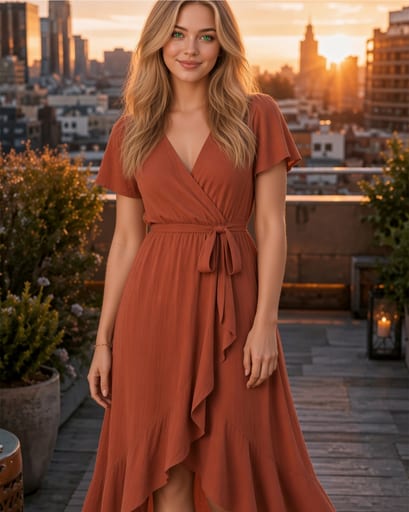
Explore Fabric and Drape
Preview a wrap front, knotted waist, or ruffled hem, then compare the fabric shape and folds with your garment reference.
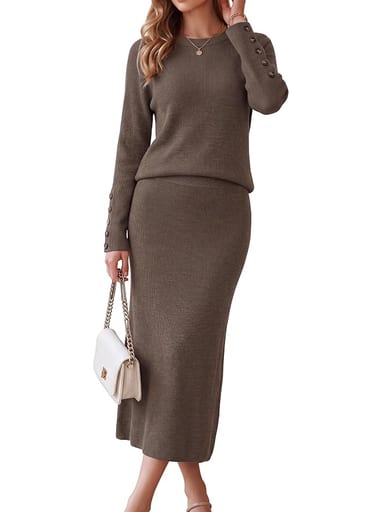
From a Product Shot
A plain product shot on white — seams, buttons, and ribbed texture read clearly enough to work as a garment reference.
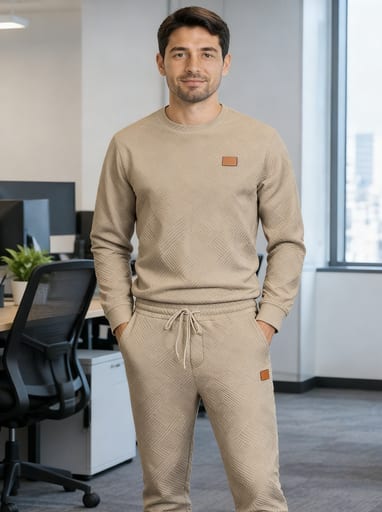
Inspect Patterns and Stitching
Try quilted textures, ribbed cuffs, or small trim details. Fine patterns and stitching may change during generation, so inspect them before publishing.
How to Change Clothes in a Photo
Add a Photo
Drop in one clear portrait. There is nothing to crop, mask, or resize first — the editor prepares the image for you.
Pick the Look
Attach a garment photo, then press Generate. The model reads the reference and rebuilds the clothing in place.
Save the Result
The finished image arrives with a download link and a copyable URL, and it stays in your history so you can pull it up again later.
Affordable Pricing
Change any outfit, in any photo. Pick a plan and start generating.
Starter
Occasional outfit changes, full quality.
- 400 credits per month
- Up to 40 Preview or 20 Studio / Pro generations
- Preview 10 · Studio 20 (up to 4 images) · Pro 20 (prompt-guided)
- Commercial use license
Plus
For regular styling and content work.
- 1,200 credits per month
- Up to 120 Preview or 60 Studio / Pro generations
- Preview 10 · Studio 20 (up to 4 images) · Pro 20 (prompt-guided)
- Commercial use license
Pro
Highest allowance for teams and heavy production.
- 2,800 credits per month
- Up to 280 Preview or 140 Studio / Pro generations
- Preview 10 · Studio 20 (up to 4 images) · Pro 20 (prompt-guided)
- Lowest cost per credit
- Commercial use license
Three plans, one balance. Every plan unlocks all three modes — Preview, Studio, and Pro.
Cancel anytime — no lock-in contract · Payments handled by Dodo Payments — Visa, Mastercard, Amex, and Apple Pay.
AI Clothes Swap: Questions People Ask
You give the tool two things — a person photo and either a garment shot or a written description — and it rebuilds the outfit in place. The face, pose, lighting, and background are held as they were, so the result reads as the same person in different clothes.
More AI Fashion Tools
Start from whichever angle fits the task — they all land in the same editor.